One memory for the whole operation
Relationships, opportunities, delivery work, documents, money, decisions and next actions stay connected, giving the business context that survives handovers and busy weeks.
Finished Windows CRM, configured for your team
Blackvault CRM is a finished local-first Windows product that connects relationships, work, documents, money and administration, then is configured around the way each client actually operates.
A guided demo follows complete workflows through a populated workspace: from first contact and opportunity to delivery, documents, money records, follow-up and accountable change. Direct onboarding then maps users, permissions, data and backup routines to your requirements.
Blackvault CRM
CRM interface with fictional example records
Activity history
Opportunity pipeline
Document records
Relationships, opportunities, delivery work, documents, money, decisions and next actions stay connected, giving the business context that survives handovers and busy weeks.
The Windows desktop product keeps data custody, exports, backups and recovery close to the team, with the records that run the operation under practical local control.
Direct onboarding maps users, named admins, permissions, imports and support to the way the organisation already assigns work and makes decisions.
Six-step guided tour
Move from priorities and relationship context through opportunity, delivery, documents and accountable history. Every screen is from the real Blackvault CRM and every person, organisation, value and activity record is fictional.
Guided product tour
Six stages from the day's priorities to accountable history.
Step 01 / Actual CRM screen
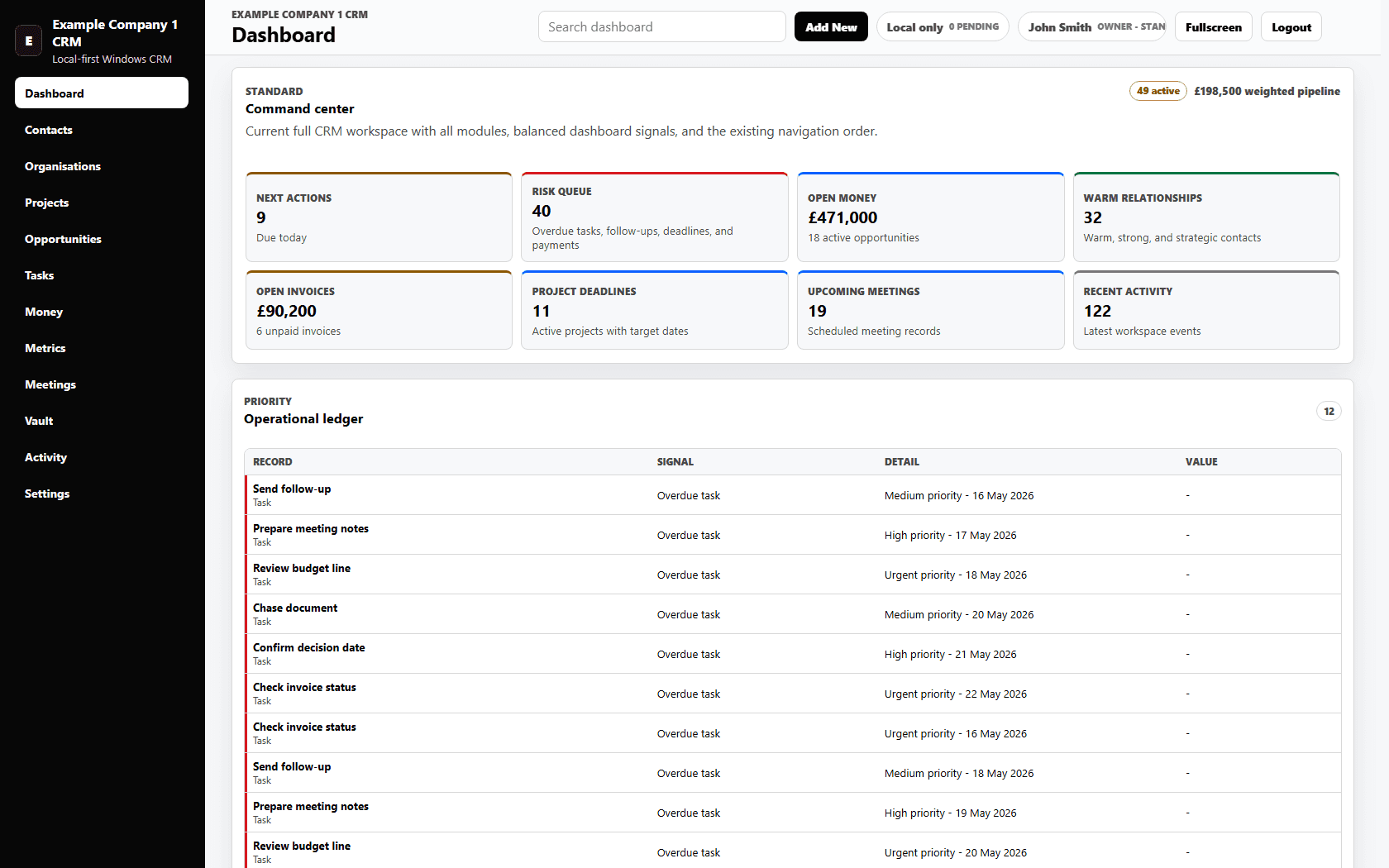
Open the dashboard to see overdue work, meetings, invoices, pipeline movement and recent activity together.
Operational consequence
The team starts from one shared operational picture instead of reconstructing priorities across separate tools.
Actual Blackvault CRM interface populated entirely with fictional demo records.
The guided sequence shows the product before client configuration. Onboarding then maps the same connected system to the organisation's users, permissions, imports, provider requirements and continuity routines.
Read the CRM build noteBlackvault preserves the context around relationships, delivery, documents and commercial decisions while giving admins the controls needed to keep that record dependable.
CRM context moves with the work
Operational relationships remain explicit while work events append to activity history inside a permissions boundary.
Relationship context
Shared account context
Commercial possibility
Delivery record
Owned next action
Relationship evidence
Delivery evidence
Commercial evidence
Reviewed record change
Accountable change
Keep contacts, organisations, conversations, meetings and next steps together so trust and context do not depend on one person's memory.
Connect opportunities, projects, tasks, owners and priorities so the team can move from a conversation to delivery without losing the reasoning in between.
Link documents, notes, values and money records to the people and work they concern, making commercial context easier to find and act on.
Give admins clear permissions and activity history, then support everyday continuity with reviewed imports, exports, backups, archive and restore.
Data ownership is part of daily operation: records remain close, access is deliberate, changes are visible and recovery is planned before it is needed.
The finished product covers relationships, work, documents, money, admin, imports, backups and activity history. Guided configuration aligns those capabilities to each client's people, processes and responsibilities.
Contacts, organisations, projects, opportunities, tasks, notes, meetings, documents, money records and activity history in one structured workspace.
A Windows-first desktop CRM built around local-first data ownership and practical daily use.
User accounts, named admins, primary/system admin controls, role-based access and permission settings.
Spreadsheet-style imports, review flows, backups, archive and restore workflows for reviewable operational changes.
Activity history and audit-style logs to help teams understand what changed, who changed it and when.
Provider pathways are configured to client requirements and confirmed during setup. Local calendar export is available in supported builds; external calendar, email and provider automation are included only when scoped and validated.
Blackvault connects contacts, organisations, opportunities, projects, tasks, meetings, documents, money records and activity history so the team can see the relationship, the work and the next action in one place.
Yes. Blackvault CRM is a finished local-first Windows product supplied through direct configuration, deployment and onboarding for each client.
Configuration covers the workflows being brought together, users and admins, permissions, data migration, backup routines, deployment, support and any provider connections the organisation needs.
Yes. The product includes import and export routes, backups, archive and restore workflows, and activity history so operational records remain usable and recoverable.
Local calendar export is available in supported builds. External calendar, email and provider automation are added only when they are required, scoped and confirmed for the client's environment.
From daily relationship records to permissions and recovery, each part of Blackvault CRM contributes to a clearer, more durable operating memory.
Contacts, organisations, notes, meetings, documents, file links, activity history and connected context for every relationship.
Projects, opportunities, tasks, follow-ups, owners, stages and priority views for the work that sits behind income and delivery.
Money records, metrics, imports, exports, backups, archive and restore workflows so important operational data stays usable and recoverable.
Users, admins, role-based permissions, activity logs and audit-style history for teams that need clarity around access and change.
Provider pathways are configured during setup. Local calendar export is available in supported builds; external calendar, email and provider automation are included only when required, scoped and validated.
A Windows-first workspace designed around data custody, exportability and practical daily use rather than unnecessary subscription sprawl.
Direct onboarding starts with the records, responsibilities and handovers that matter, then configures the finished Windows product around the team that will rely on it.